

A camera is a sensor that reads what a number cannot: a wilting leaf, a pest on the underside, a door left open, the slow march of a time-lapse. For a grower it is the cheapest way to be in two places at once. The trick is matching the camera to the job, because a two-dollar chip and a security camera solve very different problems.
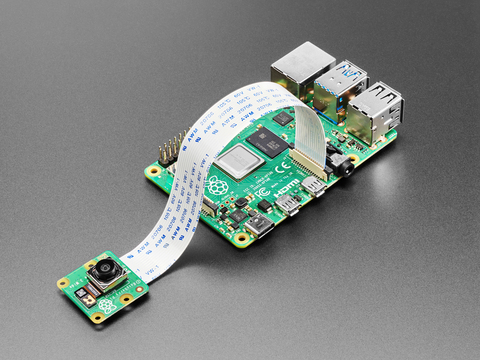
A camera is a sensor.
The other sensors here give you a single number; a camera gives you the whole scene, and increasingly a number on top of it. A time-lapse turns a season into a thirty-second clip. A remote view answers “is the greenhouse all right” from the kitchen. And paired with a little computing, a camera can count: spotting pests, flagging disease, or measuring canopy cover. That last step, plant vision, is where a camera stops being a convenience and becomes a real instrument.
Compare the cameras.
Four ways to put an eye on the crop, from a few dollars to a polished appliance. The prose under the table is the guide, since each suits a different job.
| Spec | ESP32-CAM | Pi Camera | USB webcam | IP camera |
|---|---|---|---|---|
| Needs | Just the board + Wi-Fi | A Raspberry Pi | A Pi or PC | Your network |
| Quality | Low (2 MP), basic | High, autofocus | Decent | High |
| Wireless | Wi-Fi built in | Via the Pi | Via the host | Wi-Fi or PoE |
| Effort | Fiddly to flash | Moderate | Easy | Plug and play |
| Cost | A few dollars | Pi + ~$25 | Cheap | Tens to hundreds |
| Best for | A cheap networked snapshot | Quality vision and AI | Simple monitoring, time-lapse | Security, continuous watch |
The ESP32-CAM is the cheap, all-in-one option, but it is fiddly: no native USB (you flash it through an adapter), only 2 megapixels, and a tendency to brown out on weak power. A newer ESP32-S3 camera board is friendlier. For real image quality or any AI work, a Raspberry Pi with a camera module or a plain USB webcam is the better path; for hands-off security, an IP camera.
When the picture is a measurement.
Everything above treats the camera as a convenience: a look at the place when you are not there. The moment you want the camera to tell you about the plant (growth rate, color shifts, early disease, pests), it becomes an instrument, and different rules take over. The spec that matters stops being megapixels and becomes millimeters per pixel at the leaf, which framing controls as much as the sensor does; the automatic exposure and focus that make a security camera pleasant make an instrument useless; and every frame wants a reference in it so today's picture and last month's mean the same thing. That whole discipline, including which of these cameras honestly fits which job, has its own page.
Imaging in agriculture Camera resolution calculator The Station Card
Keep the watching local.
A camera is the most personal sensor on the farm, so where its footage goes matters. Many consumer cameras push everything to a vendor cloud by default. The own-your-data path keeps it on your own hardware: a Raspberry Pi running Frigate or Home Assistant can record local IP-camera streams and even run on-device object detection, with nothing leaving your network unless you choose. Look for cameras that speak the open RTSP stream protocol rather than cloud-only ones, and the footage stays yours.
Other watchers.
The rest of the “plant and space” corner watches without a lens. A PIR motion sensor notices movement (a person, an animal, a door). A time-of-flight or ultrasonic distance sensor measures a gap, useful for tank and reservoir levels or bench presence. A load cell weighs, which can track a plant’s water use or a hive’s honey. None of these need a camera, and all read with any microcontroller.
Where they fit, and where they don’t.
Where they fit
- Time-lapse and remote check-ins on a crop.
- Spotting pests, disease, or canopy changes by eye or AI.
- Local security and continuous monitoring (IP camera).
- Level and presence, with distance or motion sensors.
Where they don’t
- Sending a far-field image over LoRa; it is far too much data.
- Quality vision from an ESP32-CAM; it is low-res and fiddly.
- Cloud-only cameras, if you care about owning the footage.
- Battery-only AI vision; it needs steady power and a computer.
Resources.
These open in a new tab:
Raspberry Pi Camera Module 3 Frigate (local camera AI) Espressif camera (ESP32-CAM) The Raspberry Pi
Frequently asked questions.
What camera should I use for a greenhouse?
It depends on the job. For a cheap networked snapshot, an ESP32-CAM works but is fiddly and low-res. For good image quality or AI, use a Raspberry Pi with a camera module or a USB webcam. For hands-off security and continuous recording, an IP camera fed into local software.
Is the ESP32-CAM any good?
It is cheap and all-in-one, with Wi-Fi built in, which is its appeal. But it is fiddly: you flash it through a separate adapter, it is only 2 megapixels, and it can brown out on weak power. A newer ESP32-S3 camera board is easier, and a Raspberry Pi camera is far better for quality.
Can I keep my camera footage off the cloud?
Yes. Choose cameras that provide an open RTSP stream rather than cloud-only ones, and record them on your own hardware with software like Frigate or Home Assistant on a Raspberry Pi. The footage, and any AI detection, then stays on your network.
Can a camera detect pests or disease automatically?
With a computer behind it, increasingly yes. A Raspberry Pi, or a small PC with an accelerator, can run object-detection or classification models to flag pests, disease, or canopy changes; an ESP32-S3 can run small models for yes-or-no questions (is the door shut, is the tray flooded), not for plant work. It takes setup and good lighting, but plant vision is a real and growing use.
Can I send camera images over LoRa?
No. LoRa carries tiny messages, and an image is far too much data. For a remote camera you need Wi-Fi, cellular, or a wired link with real bandwidth. LoRa is for numbers, not pictures.