

A battery backup, an uninterruptible power supply or UPS, keeps your hub running through a power cut. When the mains drops, it switches to the battery with no interruption, so the Raspberry Pi running your whole place does not just blink out. For a grow system that logs data and runs automations around the clock, that ride-through is the difference between a brief outage and a corrupted card and a morning of repair.
What it is.
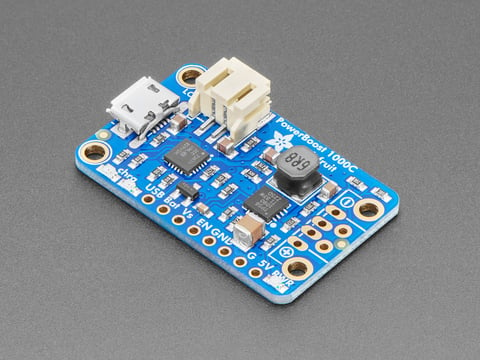
A battery and a bit of circuitry that sits between the wall and your device. While mains is present it powers the device and keeps the battery charged; when mains drops it hands over to the battery without the device noticing. The key feature is load-sharing (or pass-through): it runs the load and charges the battery at the same time, so the switch-over is uninterrupted. The board pictured is a small LiPo charger and boost that does exactly this for a 5-volt device.
Why a hub needs one.
A computer writing to an SD card or disk when the power vanishes can corrupt what it was writing, and on a Pi that often means a trashed card and a rebuild. A hub running Home Assistant writes constantly, so it is exactly the kind of always-on device that a sudden cut hurts. Sensor nodes can usually just reboot and carry on, but the brain of the operation should not. A backup turns a power blip from a disaster into a non-event.
Safe-shutdown signaling.
The best backups do more than hold the device up; they tell it what is happening. A good UPS sends the Pi a signal that says “mains is gone, you are on battery,” so the system can wait out a short outage and, if the battery runs low, shut down cleanly before it dies, closing its files instead of being yanked. A backup without that signaling still buys ride-through time, but one with it protects the data even through a long outage. Look for this on anything backing up a hub.
DIY vs ready-made.
Two ways to get there. The do-it-yourself path is a load-sharing LiPo charger and boost, like the one pictured: a battery, the board, and a 5-volt output, which gives a small device uninterrupted backup for cheap. The ready-made path is a UPS HAT built for a Raspberry Pi, which stacks on the board, often holds the cells, and includes the safe-shutdown signaling out of the box. For a quick node, the DIY route is fine; for the hub that runs everything, a proper UPS HAT with shutdown signaling is worth it.
Key facts.
Where it fits, and where it doesn’t.
Where it fits
- The always-on hub running Home Assistant.
- Protecting an SD card from a sudden power cut.
- Riding through brief, common outages on the mains.
- Any device where losing power mid-write hurts.
Where it doesn’t
- Off-grid running for days; that is solar and a battery.
- A node that can simply reboot and carry on.
- Replacing a proper supply; it sits alongside one.
- Big mains loads; this is for small DC devices.
Resources & where to buy.
Adafruit load-sharing charger The supply it backs up The battery Supplies & UPS overview
Frequently asked questions.
Why does my Raspberry Pi hub need a UPS?
Because a Pi writing to its SD card when the power vanishes can corrupt the card, and a hub running Home Assistant writes constantly. A UPS switches to battery the instant mains drops, so a brief outage becomes a non-event instead of a trashed card and a rebuild. Sensor nodes can usually just reboot, but the brain of the operation should not lose power suddenly.
What is safe-shutdown signaling?
It is the UPS telling the Pi that mains is gone and it is on battery, so the system can wait out a short outage and, if the battery runs low, shut down cleanly before it dies, closing its files instead of being yanked. A backup without it still buys ride-through time, but one with it protects the data through a long outage too.
What is the difference between a UPS and a solar power setup?
A UPS rides through brief mains outages for a device that is normally wall-powered, keeping it alive minutes to hours until power returns. A solar and battery setup powers an off-grid device that has no mains at all, sized to run for days. Use a UPS for the hub on the wall; use solar and a battery for the node out in the field.
What is load-sharing and why does it matter for a UPS?
Load-sharing, or pass-through, means the board powers your device and charges the battery at the same time, so when mains drops the switch-over to battery is uninterrupted and the device never notices. Without it, there can be a gap at the handover that defeats the purpose. It is the core feature that makes a battery backup actually uninterruptible.