

There are dozens of microcontrollers and the choice can freeze a beginner. It should not. For most grower projects the answer is one board, and the exceptions are few and clear. Here is the short version, then the handful of cases where something else is the better buy.
The one-line answer.
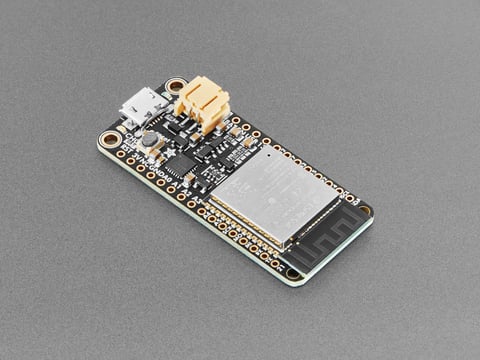
Buy an ESP32-C3 board with a USB-C socket. It is the cheapest in the family, it has both Wi-Fi and Bluetooth, it flashes with no driver to install, and it does everything a typical sensor node needs. If you are not sure what you need, that is the board. Everything below is just the exceptions.
By what you want to do.
Match the goal to the board:
The shortlist.
The five you will actually choose between, side by side. The tinted column is the default.
| Spec | ESP32-C3Start here | ESP32-S3 | ESP32-C6 | Pico 2 W | Arduino |
|---|---|---|---|---|---|
| Wireless | Wi-Fi + BLE | Wi-Fi + BLE | Wi-Fi 6 + BLE + Thread | Wi-Fi + BLE | Usually none |
| Standout | Cheapest, native USB | Dual-core, camera/AI | Matter and Thread | Exact timing, PIO | Easiest to learn, 5 V |
| Cost | Lowest | Low | Low | Low | Low |
| Best for | Everyday sensor nodes | Camera, display, AI | Smart-home mesh | Motors, precise timing | Learning, shields |
For the full detail behind each, see the ESP32 family, the Pico, Arduino, the ESP8266, and the specialist families.
Two rules when buying.
Whatever you land on, these save grief:
- Prefer USB-C and native USB. The C- and S-series flash with no driver and no fuss. A USB-C socket also saves you hunting for an old cable.
- Buy a board that names the exact chip. A listing that just says “ESP32” is not enough to know if it is a classic, a C3, or something else. Look for the specific variant.
And if you are still unsure whether you even want a microcontroller rather than a small computer, read a computer or a microcontroller first.
Frequently asked questions.
What microcontroller should a beginner buy?
An ESP32-C3 board with a USB-C socket. It is the cheapest in the ESP32 family, has Wi-Fi and Bluetooth built in, and flashes with no driver to install. It covers what a typical sensor node needs, so if you are unsure, that is the one to get.
When should I not buy an ESP32-C3?
Step up or sideways for a specific need: an ESP32-S3 for a camera, display, or AI; an ESP32-C6 for Matter, Thread, or Zigbee; a classic ESP32 to follow old tutorials or for Bluetooth audio; a Raspberry Pi Pico for exact timing or MicroPython; an Arduino to learn or for 5 volt shields.
Is the ESP32 or the Raspberry Pi Pico better?
For a Wi-Fi sensor and the smoothest path into Home Assistant, the ESP32. For exact, repeatable timing, programmable I/O, or learning with MicroPython, the Pico. They are good at different things; the ESP32 is the more common default for connected sensors.
Do I need an Arduino to start?
No. You can start directly with an ESP32, which is cheaper and has wireless. An Arduino is worth it when you want the gentlest learning curve, sturdy 5 volt I/O, or a specific shield. You program both with the same Arduino software, so the skill carries over.
What does it mean if a listing just says "ESP32"?
It is not specific enough. “ESP32” could be the classic dual-core chip or any of several newer variants like the C3 or S3, which differ a lot. Buy from a seller who names the exact variant, and prefer one with a USB-C socket and native USB so it flashes without a driver.