

Arduino is the friendliest way into electronics, and for many people it is where this whole hobby starts. It is two things at once: a family of simple, rugged microcontroller boards like the Uno and the Nano, and the free software (the Arduino IDE and language) used to program them. That software also programs the ESP32 and the Pico, so Arduino matters even if you never buy an Arduino-brand board.
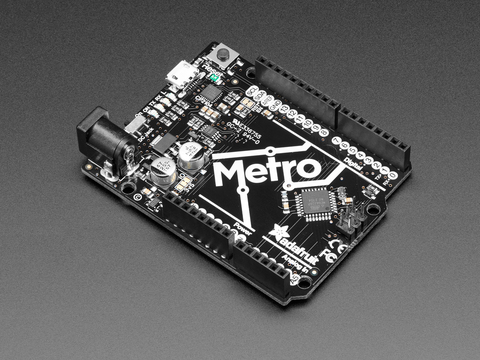
What it is.
The classic Arduino boards (the Uno and the Nano) are built around a simple 8-bit chip, the ATmega328P. By modern numbers it is slow and small, with no wireless at all. That sounds like a weakness, and for a connected sensor it is. But it is also why Arduino is such a good teacher: the boards are forgiving, run on sturdy 5 volt logic, accept a huge range of plug-on “shields,” and are backed by more beginner tutorials than any other platform. Newer models (the Uno R4 and the Nano ESP32) add real speed and wireless while keeping the friendly shape.
Two things named Arduino.
It helps to keep them separate. Arduino the hardware is the boards. Arduino the software is the IDE and the simple language, and it is the on-ramp most people learn to code on. The important part for a grower: that same software, with the free ESP32 core, programs an ESP32 too. So you can learn on Arduino and carry the skill straight to the cheaper, wireless boards this site leans on. Learning Arduino is never wasted.
Compare the boards.
The Arduinos a grower is likely to meet, with an ESP32-C3 in the last column for contrast. The big divide is wireless and voltage: classic Arduinos are 5 volt and have no radio; the newer ones and the ESP32 are 3.3 volt with Wi-Fi and Bluetooth built in.
| Spec | Uno R3 | Nano | Uno R4 WiFiModern Uno | Nano ESP32 | ESP32-C3 |
|---|---|---|---|---|---|
| Chip | ATmega328P | ATmega328P | Renesas RA4M1 | ESP32-S3 | ESP32-C3 |
| Architecture | 8-bit AVR | 8-bit AVR | Arm Cortex-M4 | Xtensa LX7 | RISC-V |
| Clock (MHz) | 16 | 16 | 48 | 240 | 160 |
| Logic | 5 V | 5 V | 5 V | 3.3 V | 3.3 V |
| Wi-Fi / BT | None | None | Wi-Fi + BLE | Wi-Fi + BLE | Wi-Fi + BLE |
| USB | Type-B | Mini/Micro | USB-C | USB-C | Serial / JTAG |
| Form factor | Uno + shields | Tiny | Uno + shields | Nano | Varies |
| Best for | Learning, 5 V | Small 5 V builds | Modern Uno, wireless | Arduino shape, ESP32 power | Cheap wireless nodes |
The classic Uno and Nano run on 5 volt logic, which is sturdier around older 5 volt sensors but incompatible with 3.3 volt parts without a level shifter. The Uno R4 Wi-Fi and Nano ESP32 add wireless; the Nano ESP32 is, in effect, an ESP32 in an Arduino shape.
Where it fits, and where it doesn’t.
Where it fits
- A first board, with the most tutorials to learn from.
- Sturdy 5 volt projects and older 5 volt sensors.
- Builds that use plug-on shields.
- Wireless, if you pick a Uno R4 Wi-Fi or Nano ESP32.
Where it doesn’t
- A cheap wireless sensor node. An ESP32-C3 costs less and has Wi-Fi built in.
- Memory-hungry work. A classic Uno has very little RAM.
- Running software or a hub. Use a Raspberry Pi.
Arduino or ESP32.
For most connected sensor work on this site, the ESP32 wins on price and built-in wireless. Reach for an Arduino when you want the gentlest possible start, when a project needs reliable 5 volt I/O or a specific shield, or when you are following an Arduino tutorial step by step. And if you want both worlds, the Nano ESP32 puts an ESP32 in the familiar Arduino shape and toolchain. Whichever you pick, you program it with the same Arduino software, so the skill carries over.
Official resources.
These open in a new tab:
Arduino: official site and boards Arduino documentation Language reference Arduino core for ESP32
Frequently asked questions.
What is an Arduino?
Arduino is two things: a family of simple, beginner-friendly microcontroller boards like the Uno and Nano, and the free software used to program them. It is the most common starting point for learning electronics and code.
Is an Arduino better than an ESP32?
They suit different goals. A classic Arduino is the gentlest way to learn and is sturdy at 5 volts, but it has no wireless. An ESP32 is cheaper and has Wi-Fi and Bluetooth built in, which makes it the better pick for a connected sensor. You program both with the same Arduino software.
Does an Arduino have Wi-Fi?
The classic Uno and Nano do not. Newer models do: the Uno R4 Wi-Fi and the Nano ESP32 add Wi-Fi and Bluetooth. For wireless on a budget, an ESP32 board is usually the simpler choice.
Can I use the Arduino software with an ESP32?
Yes. With the free ESP32 core added to the Arduino IDE, you write and flash ESP32 sketches exactly as you would for an Arduino board. Most hobbyist ESP32 code is written this way, so skills learned on Arduino carry straight over to newer wireless boards.
Why do Arduinos run on 5 volts?
The classic boards use an 8-bit chip designed for 5 volt logic, which is sturdy and forgiving around older 5 volt sensors. The trade-off is that 5 volt pins can damage a 3.3 volt part, so mixing the two needs a level shifter. Newer Arduinos and the ESP32 use 3.3 volts.