

A tower grower asked for something the hydro shop shelf doesn't really sell: a pump timer that waters 4 minutes every half hour while the grow lights are on and 2 minutes every hour while they are off, with no Wi-Fi and no cloud. This sketch is that timer. A classic ESP32, one relay and a light sensor run two watering patterns, one for lights on and one for lights off, each set to the second and up to 12 hours, from your phone. Flash it from this page in about a minute.
Like every sketch in this library it is open, and like Night Eyes it is standalone: the board raises its own small Wi-Fi network, your phone joins it, and the control page opens by itself. No app, no account, no internet. If the phone, the page or the Wi-Fi go away, the timer keeps timing.
What it does.
A recycling timer runs a load for a while, rests for a while, and repeats, with no clock. Growers use them for tower and NFT pumps, misters, cloners and flood tables, where the gaps are minutes or seconds. The common ones run one pattern and use a light sensor only to switch it on by day, by night or both. This one runs a separate pattern for each.
- Two patterns. While the lights are on, and while they are off. Each is Cycle (water so long, rest so long), Always on, or Off.
- Set to the second. Waterings from 1 second to 12 hours, rests from 5 seconds to 12 hours. Seconds for high-pressure misting, hours for a flood table.
- You choose how it fails. Tell it whether the pump is wired so a dead board leaves it running or stopped, and it drives the relay to match. More below.
- Water now, Stop, Pause. Pause stops the pump for a reservoir change and always ends by itself.
- Says what it is doing. Lights on, watering, 2:41 left of 4:00, and a list of the last waterings and light changes in your phone's clock.
What you need.
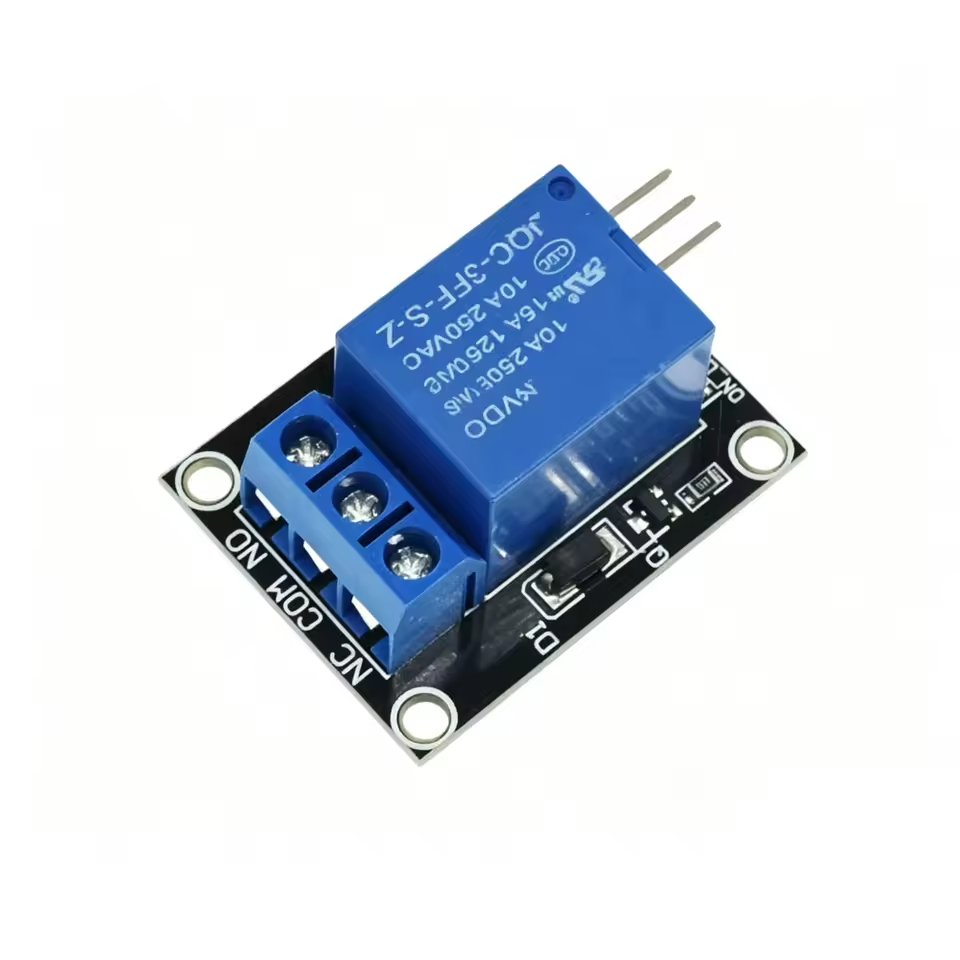
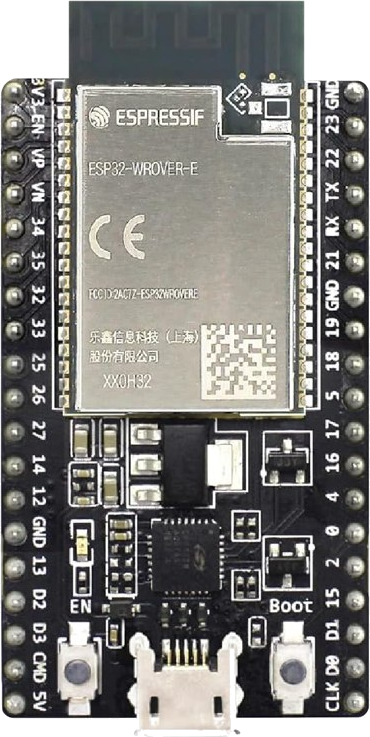
How it fails.
Every timer fails sooner or later: a power supply dies, a board locks up, someone unplugs the wrong thing. What matters is what the pump does then. A relay's coil is off whenever the board is unpowered, starting up or dead, so the contact you wire the pump to decides it:
Wired to NC: keeps running
- Common and normally closed. The pump runs whenever the coil is off.
- A dead board leaves the pump running.
- For towers, NFT, aeroponics and cloners, where roots dry out in hours and running on just recirculates.
Wired to NO: stops
- Common and normally open. The pump runs only while the coil is on.
- A dead board leaves the pump off.
- For flood tables, top-ups and anything that can overflow. Add a float switch in the pump's power as the last line.
Tell the setup page which one you wired and the timer drives the coil the right way round. The Check the wiring button runs the pump for 5 seconds and stops: if it does the opposite, the setting and the wires disagree. Then do the pull-the-plug test: unplug the board while the pump is resting and watch what the pump does. That is what a failure will do.
The firmware also guards itself. It holds the relay pin at the right level from the moment it starts, refuses pins that twitch while the board boots, and restarts the board if it ever stops running for 5 seconds.
Wire it up.
Two connections to the ESP32: the relay module's input and the light sensor. Power off while you wire:
| Part | Connects to | On the ESP32 | Note |
|---|---|---|---|
| Relay module IN | – | GPIO 16 | Any plain output; strapping pins are refused. |
| Relay module VCC | 5 V | 5V (VIN) | The USB supply. |
| Relay module GND | ground | GND | Either GND pin. |
| Photoresistor | GPIO 34 and GND | GPIO 34 | Bright light pulls the pin low. |
| 10 kΩ resistor | GPIO 34 and 3V3 | 3V3 | Analog pins 32 to 39 only. |
| Relay COM + NC or NO | the pump's switch | – | NC fails running, NO fails stopped. |
Where the light sensor goes
- Where it sees the grow lights and not a window, a doorway or a work light.
- On a short cable: a few feet of two-core wire is fine.
- The page shows the light level live, so you can find a good spot by watching it.
Why those pins
- 16 drives the relay: a plain output that does not move while the board boots, so the relay never clicks at power-up.
- 34 reads light: Wi-Fi takes over the other analog block, so only 32 to 39 can read while the timer's network is on.
- The setup page refuses a pin that cannot work, and says why.
Wall power.
The board and the relay module run on 5 V from a USB charger. These are the ways to switch a pump that runs on wall power:
| Way | How | Good for |
|---|---|---|
| The module's own terminals | Wall power goes through COM and NC or NO on the relay module, the way most people wire one. The common module's relay is rated 10 A at 250 VAC, far more than a hydroponic pump draws. | Home growers who are comfortable with wiring. Read the warning below first. |
| A low-voltage pump | The relay switches a 12 or 24 V DC pump and its own power supply directly. | Small towers, cloners, misting pumps sold for 12 V. |
| A relay box with a control input | The relay feeds 5 V into the box's low-voltage input; the box switches the outlet. Some boxes have an outlet that is on while the input is off, which suits a pump that should keep running if the board fails. | Plug-in pumps at home. Check what the box is certified for. |
| A listed contactor or relay panel | An electrician wires a listed contactor whose low-voltage coil the relay switches. | Commercial grows and anywhere that requires listed equipment. |
Flash it.
Plug the board in and press the button. The installer reads the chip on the wire and refuses to write if it isn't the board this image is for, so there is nothing to get wrong.
If the board won't take the flash, or it restarts over and over
Hold the BOOT button down while you plug the USB cable in. Let go once it is plugged in, then press the install button above. That is the whole fix, and it is worth trying first any time a board is being stubborn.
Here is what is going on. A board with no working firmware on it restarts several times a second, forever, because it looks for a program to run and finds nothing. The installer needs the board to hold still long enough to write a megabyte and a half, and it cannot get hold of one that keeps restarting. Holding BOOT as the power arrives puts the chip into the loading mode it was built with, where no program runs at all, so there is nothing to restart and the installer gets a still target.
If you have a serial monitor open, you will know it worked because the scrolling stops. Quiet is what you want.
You may also see invalid header: 0xffffffff repeating in the monitor. That reads like damage and it is not: it is what an empty chip looks like, which is exactly where a board lands if a write was interrupted. The board is fine. Flash it again with BOOT held and it will come back.
If it flashes and runs fine on its own but fails the moment the sensor is connected, suspect whatever sits between them before you suspect either one. A screw-terminal carrier, an adapter board or a breakout is a component too, and a bridged or cracked terminal on one will stop the board booting while the sensor and the ESP32 are both perfectly good. Detaching the sensor is the quickest test: if the board comes back to life, neither it nor the sensor is at fault, and the thing in the middle is where to look. That exact fault cost us most of a night.
Two other things are worth checking before you decide a board is bad. Use a data USB cable, since a charge-only cable carries power but no signal and gives you the same symptoms. And plug straight into the computer rather than through a hub, because a write that browns out part way through leaves the board empty in just this way.
You'll need a data USB cable (not charge-only) and Chrome or Edge on a computer. A classic ESP32 talks to your computer through a separate USB chip, so the first time you plug one in you may need to install its driver once: look for CP2102 or CH340 printed near the USB socket, then fetch that driver. After that the computer is done; everything else happens on your phone.
Set it up.
- Power the board from any USB charger. It starts timing at once.
- On your phone, join the Wi-Fi network
OAT-Timer-XXXXXXwith the passwordoatsetup. The control page opens by itself; if not, visithttp://192.168.4.1. - Open Setup at the bottom of the page and say how the pump is wired:
ncorno. Then press Check the wiring: the pump runs for 5 seconds and stops. - Set the two patterns, under While the lights are on and While the lights are off. Changes save themselves and apply at once.
- Teach it the lights: press The lights are on now, and when they go off, The lights are off now. The timer sets the switch point between the two, with room on both sides.
- On Setup, change the Wi-Fi password.
Lights on or off. The page shows the light level and what the timer believes. A change has to last 30 seconds before it counts, so a flashlight or an opened door changes nothing. You can also choose what happens when the lights change: start the new pattern at once with a watering, which is the default, or finish the watering or rest under way first. A pattern set to Always on or Off takes over at once either way.
Everything on the page is also on the USB console, if you like a keyboard: run, stop, check, pause 30, resume and status. Type help for the list.
Open the printable setup card (PDF)
A two-page card to keep by the reservoir: plug in, join the network, the password, the wiring check, blanks to write down both patterns and how the pump is wired, and the fixes for the usual snags.
Starting patterns.
Places to start, not prescriptions. Systems, crops and climates differ, so start here, then watch the roots and the medium and adjust. Your system maker's advice comes first.
| System | Lights on | Lights off | Wire the pump to |
|---|---|---|---|
| Vertical towers (one grower's setup) | water 4:00, rest 30:00 | water 2:00, rest 58:00 | NC |
| NFT channels | Always on | Always on | NC |
| High-pressure misting | water 0:03, rest 5:00 | water 0:03, rest 10:00 | NC |
| Flood and drain table | water 15:00, rest 3:45:00 | Off | NO, plus a float |
| Drip to coco or rockwool | water 2:00, rest 2:00:00 | Off | NO |
Misting runs in seconds: set the hours and minutes to 0 and type the seconds. A rest can't be shorter than 5 seconds, so the pump is never switched on and off faster than it can take.
Pause, power cuts, the log.
Water now and Stop watering. Water now runs one watering of the current pattern's length; Stop ends a watering and starts the rest. Check the wiring runs the pump for 5 seconds and isn't counted as a watering.
Pause. For a reservoir change: 15 minutes to 4 hours with the pump off, with the countdown on the page. A pause always ends by itself and starts again with a watering, so a forgotten pause can't leave plants dry. Resume now ends it early. Or do it the old way: unplug the pump while you work and plug it back in when you're done. The timer keeps timing either way.
Power cuts. Settings are saved on the board and come back with the power. Choose what it does first: water first (the default, for towers and NFT) or rest first. While the power is off, the pump does whatever the wiring says: running if wired to NC, stopped if wired to NO.
The log. What it did lists the last forty events, newest first: each watering and how long it ran, lights on and off, pauses, power-ups and setting changes, with times in your phone's clock. The count of waterings and pump time starts again at each power-up.
What it does not do.
It does not join your home Wi-Fi, and it sends nothing anywhere. There is no cloud, no account and no app. The only network it uses is its own, and only for setting it up: the timer runs the same with no phone anywhere near it.
It doesn't know whether the pump actually ran. It switches the relay; a dry pump, a blocked line or a tripped breaker look the same to it as a working pump. It doesn't measure water level or flow, and it isn't a light timer: it reads the lights, it doesn't switch them.
It keeps no clock. Times on the page are worked out on your phone from "this many seconds ago", so they are right without the board ever knowing the time. A fresh firmware flash erases everything, the Wi-Fi password included, which is how you hand a board on with nothing of yours left on it.
For makers & trainers.
Frequently asked questions.
How do I set a hydroponic pump to run on a different cycle at night?
Use a cycle timer with two patterns, one for when the grow lights are on and one for when they are off. A light sensor tells the timer which pattern to run. The Day/Night Cycle Timer does this on a classic ESP32 with one relay and a photoresistor: for example, water 4 minutes every 30 while the lights are on and 2 minutes every hour while they are off. Each pattern is set from a phone, to the second, from 1 second to 12 hours.
Should a tower garden pump fail on or fail off?
For vertical towers, NFT and aeroponics, a pump that stops can kill roots in hours, while a pump that keeps running usually just recirculates. Most growers want those systems to fail on: wire the pump through the relay's normally closed (NC) contact so a dead board leaves it running. Flood tables and anything that can overflow should fail off, wired through the normally open (NO) contact, ideally with a float switch in the pump's power as a last line.
Can I run a mains pump from an ESP32 relay module?
Many growers do: wall power runs through the relay module's COM terminal and its NC or NO terminal, and the common module's relay is rated 10 A at 250 volts AC, far more than a hydroponic pump draws. Electricity bites, so unplug the pump and the board every time you touch the wiring, put the module in a closed box with the cords clamped, and plug the pump into a GFCI outlet. Commercial and workplace grows generally need listed (UL or ETL) equipment for anything on wall power, so there the module should drive a listed contactor or relay box instead.
Does this timer need Wi-Fi or the internet?
No. The board raises its own small Wi-Fi network only so a phone can set it up. It never joins a home network and sends nothing anywhere. If the phone, the page or the Wi-Fi go away, the timer keeps timing on its own, and its settings survive a power cut.
What is a recycling timer?
A recycling or cycle timer switches a load on for a set time, off for a set time, and repeats, without a clock. Hydroponic growers use them for pumps, misters and aerators where the gaps are minutes or seconds, too short for an ordinary 24-hour timer. Some, like this one, also use a light sensor to run a different pattern, or none, while the lights are off.