

The Raspberry Pi is the default little computer for good reason, but it is not the only one, and sometimes not the best one. When you need x86 software, more horsepower, a fast disk, or simply a board that is in stock at a fair price, it is worth knowing the alternatives. Most trade the Pi’s unmatched community for a spec or a price.
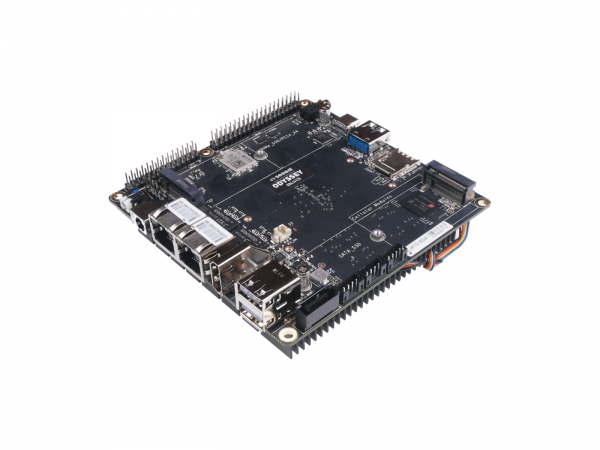
When to look past the Pi.
Reach for an alternative when one of a few things is true. You need to run x86 software that wants a normal PC. You need more performance than a Pi for cameras, AI, or a busy hub. You want a fast NVMe disk without a hat-and-adapter dance. Or, plainly, the Pi you want is out of stock or overpriced, which happens. None of these are everyday problems, which is why the Pi stays the default, but each is a real reason to shop wider.
The alternatives.
The main families, with the Pi as the baseline. The prose is the guide, since the right one depends on what is pushing you off the Pi.
| Spec | Raspberry Pi | Other ARM SBC | Radxa Rock | Mini PC (x86) |
|---|---|---|---|---|
| Examples | Pi 4, Pi 5, Zero 2 W | Orange Pi, Banana Pi | Rock 5 (RK3588) | Intel N100 box |
| CPU | ARM | ARM | ARM, fast | x86 |
| Software support | Best, huge community | Variable | Decent, improving | Runs anything |
| GPIO pins | 40-pin | Usually 40-pin | 40-pin | None |
| Standout | The ecosystem | Price or specs | Power + NVMe | x86 and speed |
| Best for | The safe default | Cheaper or faster, if supported | Heavy ARM workloads | A powerful hub, cameras, AI |
Orange Pi, Banana Pi, and similar boards copy the Pi’s shape and often beat it on price or raw specs, with the catch noted below. The Radxa Rock line (and other RK3588 boards) are genuinely powerful ARM machines with NVMe. A mini PC is a different animal entirely: a small x86 computer.
The case for a mini PC.
For a hub that does real work, a small x86 mini PC (an Intel N100 box and its kin) is often the smart money. It runs any standard operating system and any Docker image without the “does it work on ARM” guessing, handles several cameras and on-device AI without breaking a sweat, boots from a real SSD, and frequently costs about the same as a maxed-out Pi once you add storage and a case. The trade is no GPIO pins, so it is a hub, not a thing you wire sensors to directly. Pair it with microcontrollers out at the benches and it makes a strong brain in the middle.
The software-support catch.
Here is the honest warning. The Raspberry Pi’s real advantage is not its hardware; it is that everything is tested on it and every tutorial assumes it. Other ARM boards often ship with a rougher operating-system image, slower security updates, and forum answers that trail off. Before you buy a non-Pi ARM board, check that the software you intend to run actually supports it well. An x86 mini PC dodges this entirely, because it is just a PC. When in doubt, the Pi’s ecosystem is worth a few dollars and a few megahertz.
Where they fit, and where they don’t.
Where they fit
- A heavier hub: many cameras, AI, databases (mini PC).
- x86-only software.
- More performance or NVMe than a Pi offers.
- When Pis are out of stock or overpriced.
Where they don’t
- A first project; the Pi has the most help.
- Wiring sensors directly to a mini PC; it has no GPIO.
- An ARM board whose software support you have not checked.
- A cheap, low-power field node; that is a microcontroller.
Resources.
These open in a new tab:
Orange Pi Radxa (Rock) Home Assistant install options The Raspberry Pi
Frequently asked questions.
Is there a better alternative to the Raspberry Pi?
Better for a specific need, not in general. Orange Pi and similar boards can beat it on price or specs, the Radxa Rock line is more powerful, and an x86 mini PC runs standard software with more horsepower. But the Pi has the best software support and community, so it stays the safe default unless you have a clear reason to switch.
Should I use a mini PC instead of a Raspberry Pi?
For a heavier hub, often yes. An x86 mini PC like an Intel N100 box runs any software without ARM-compatibility worries, handles cameras and AI well, and boots from a real SSD, frequently for about the price of a fully kitted Pi. The trade-off is no GPIO pins, so it is a hub, not a board you wire sensors to.
Do Orange Pi and other ARM boards run the same software as a Pi?
Often, but not always as smoothly. They use different chips, so the operating-system images can be rougher, updates slower, and community help thinner. Check that the specific software you want to run supports the board well before buying.
What is the difference between an SBC and a mini PC?
A single-board computer like the Raspberry Pi is usually an ARM board with GPIO pins for connecting electronics. A mini PC is a small x86 computer that runs standard PC software but has no GPIO. The SBC is friendlier for hardware projects; the mini PC is stronger as a pure hub.
Which board is best for running Home Assistant with cameras and AI?
A capable x86 mini PC is a common choice, because object detection and several camera streams are demanding. A Raspberry Pi 5 can handle a modest setup, but for heavier vision work a mini PC gives more headroom for the money.